


Beschreibung
Die Onesait Platform ist eine umfangreiche, offene Digital- und Integrationsplattform, die Daten, IoT, APIs, Low-Code-Entwicklung und KI-Funktionen unter einem Dach vereint. Sie ist flexibel einsetzbar (für hybride Cloud- oder lokale Szenarien) und unterstützt Unternehmen bei der schnellen Umsetzung digitaler Lösungen und datengetriebener Geschäftsmodelle.
Evaluierung
Was kann die Plattform besser als wir?
- Self-Service
- Der Anwender kann selbstständig Datenmodelle, REST APIs, Microservices, WebApps, Dashboards, Datenpipelines,… erstellen
- Es können unterschiedliche Quellen angebunden werden (Datenbanken, Cloud Storage, …)
- Daten können als eigene Datenmodelle importiert werden
- Module können über die Oberfläche aktiviert/deaktiviert werden
- Es gibt viele Tools/Module, die eingebunden werden können z.B.:
- Persistence
- Es können unterschiedliche Datenbank eingebunden werden (z.B. MongoDB, TimescaleDB, PrestoDB, Elasticsearch, …)
- Processing
- Dataflow: IBM StreamSets (https://www.ibm.com/products/streamsets) - Erstellung und Verwaltung von Streaming-Datenpipelines per GUI
- ML & AI
- Notebook: Apache Zeppelin (https://zeppelin.apache.org/) - Webbasierte Datenanalysen
- MLOps: MLflow (https://mlflow.org/) - A Tool for Managing the Machine Learning Lifecycle
- LLM Flow Manager: Flowise (https://flowiseai.com/) - Build AI Agents visually
- Data Refiner Tool: OpenRefine (https://openrefine.org/) - Programm zur Bereinigung und Umwandlung von Daten
- Data Labeling Tool: Label Studio (https://github.com/HumanSignal/label-studio) - Open Source data labeling Tool
- Logic
- Flow Engine: Node-RED (https://nodered.org/) - Datenflüsse grafisch modellieren
- Die meisten Module/Tools sind relativ gut in die Oberfläche integriert
- Persistence
Welche Schwächen hat sie, die wir besser beherrschen?
- Dashboards sind nicht gut in die Oberfläche integriert
Können wir ausgewählte Komponenten bei uns nutzen? Macht es Sinn einzelne Module zu integrieren? Wie ist der Aufwand?
- Bei vielen Komponenten/Modulen handelt es sich um Open Source Software, die für die Integration in die Onesait-Plattform erweitert wurden. Wenn wir nur diese Tools bei uns integrieren wollen, ist es sinnvoller die Tools direkt zu integrieren, da wir sonst auch die Onesait Dependencies auflösen müssten (z.B. persistence, security, …).
- Bei konkreteren Anforderungen, ist es sicherlich sinnvoll abzugleichen, welches Tool dafür in Onesait eingesetzt wird.
Releases
Release History: https://onesaitplatform.com/space/ROAD/7897561/Releases+History
Aktuellstes Release: 25 April 2025, Onesait Platform (Zelda) release 7.0.0
Jedes Quartal ein neues Release
Lizenzarten
| Edition | Lizenzierung | Hauptnutzen | Lizenzkosten |
|---|---|---|---|
| Community Edition | Open Source (Apache 2.0) | Entwicklung, Test, freie Nutzung | Kostenlos |
| Enterprise Edition | Kommerzielle Lizenz + Supportvertrag | Produktion, Unternehmens-Rollouts | Preis auf Anfrage |
https://blog.onesaitplatform.com/en/2019/10/10/onesait-platform-community-vs-enterprise-edition
On this Community version we generate a tested Enterprise version ready to be put into production on which we offer support through a subscription.
https://onesaitplatform.com/page/support
There are 2 subscriptions:
- Development Subscription: applies to non-productive environments and offers support to the developments made on the platform and basic operation support in non-productive environments.
- Production Subscription: for productive environments, it offers Level 3 support to the operation of the platform in productive environments.
Open Source & Community
Die Plattform bietet eine Community Edition und eine Ultimate/Enterprise Edition - inklusive Community-Ressourcen und freien Testumgebungen (CloudLab)
https://github.com/onesaitplatform/onesaitplatform-cloud/tree/6.3.0-ce/sources
Lizenz
Onesait Platform is Open Source software released under the Apache Software License 2.0.
Technologie
https://onesaitplatform.com/space/DOCT/2220813314/A+look+at+the+Platform+Architecture
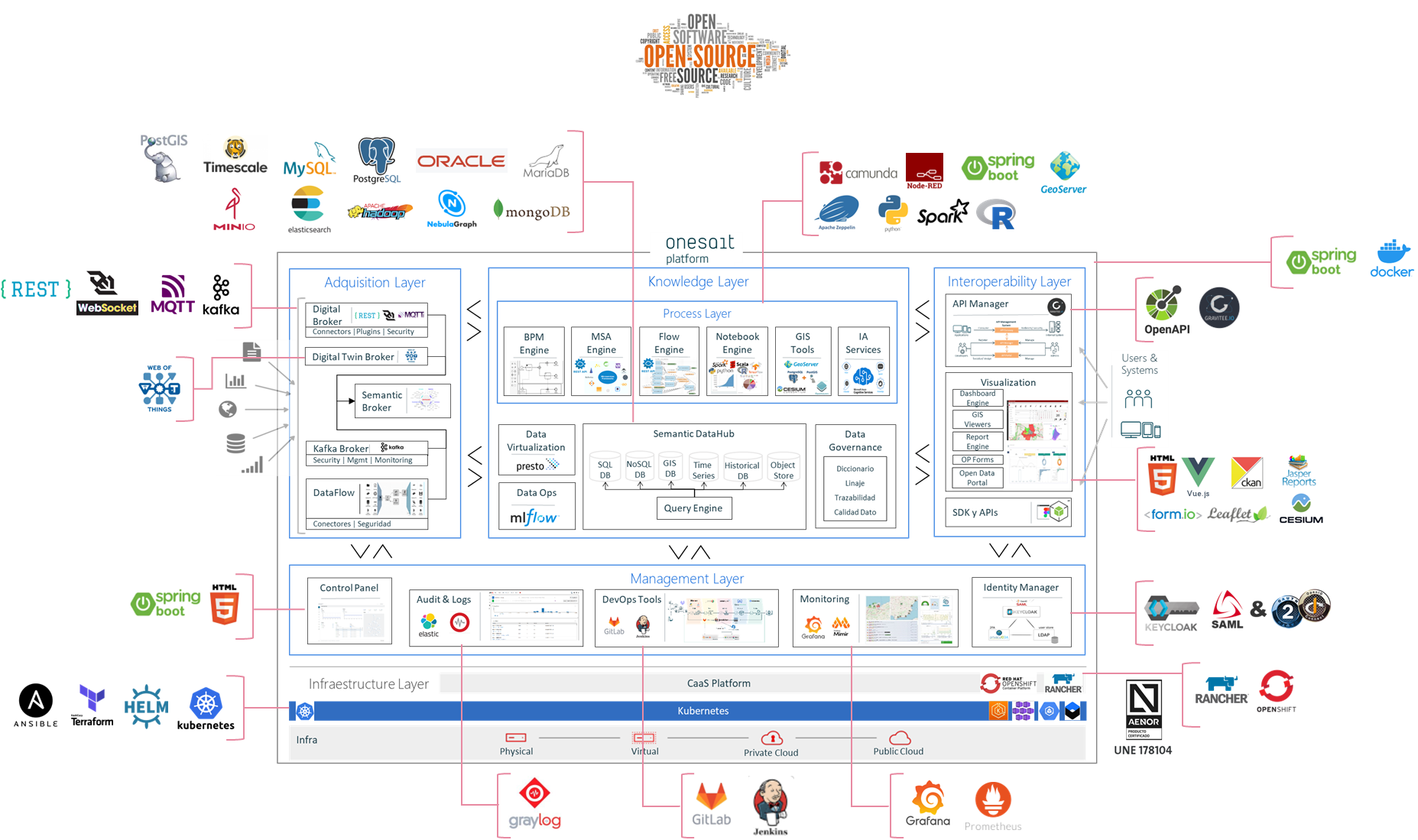
| MODULE | TECHNOLOGY |
|---|---|
| Base Technology | Java >8 Spring Boot 2.X |
| Control Panel | Spring Boot over Thymeleaf. ConfigDB on MariaDB, Postgresql,… |
| Semantic Data Hub | MongoDB as reference implementation for online storage. MinIO+Presto as reference implementation for historical and analytics storage. Relational Databases supported. ElasticSearch supported. |
| DataFlow | Streamsets (and some components) integrated on platform |
| Flow Engine | Node-red: Configuration and development on Node-red (components, multitenant,…) |
| Digital Broker | Spring Boot development Kafka for high performance streaming. MQTT Moquette for bidirectional communication. WebSockets for web communication. |
| API Manager | Development on Spring Boot + Integration with Gravitee |
| Dashboard Engine | Angular + Gridster as the engine. ODS as reference components library eCharts as library for gadgets. |
| Notebooks | Configuration and Interpreter on Apache Zeppelin |
| DataGrid & Cache | Hazelcast |
| Identity Manager | Reference Implementation: Development over Spring Cloud Security Advanced Implementation: Integration with Keycloak |
| BPM Engine | Camunda |
| Deployment | Containerized modules on Docker Orchestrated by Kubernetes Managed by CaaS Rancher or OpenShift |
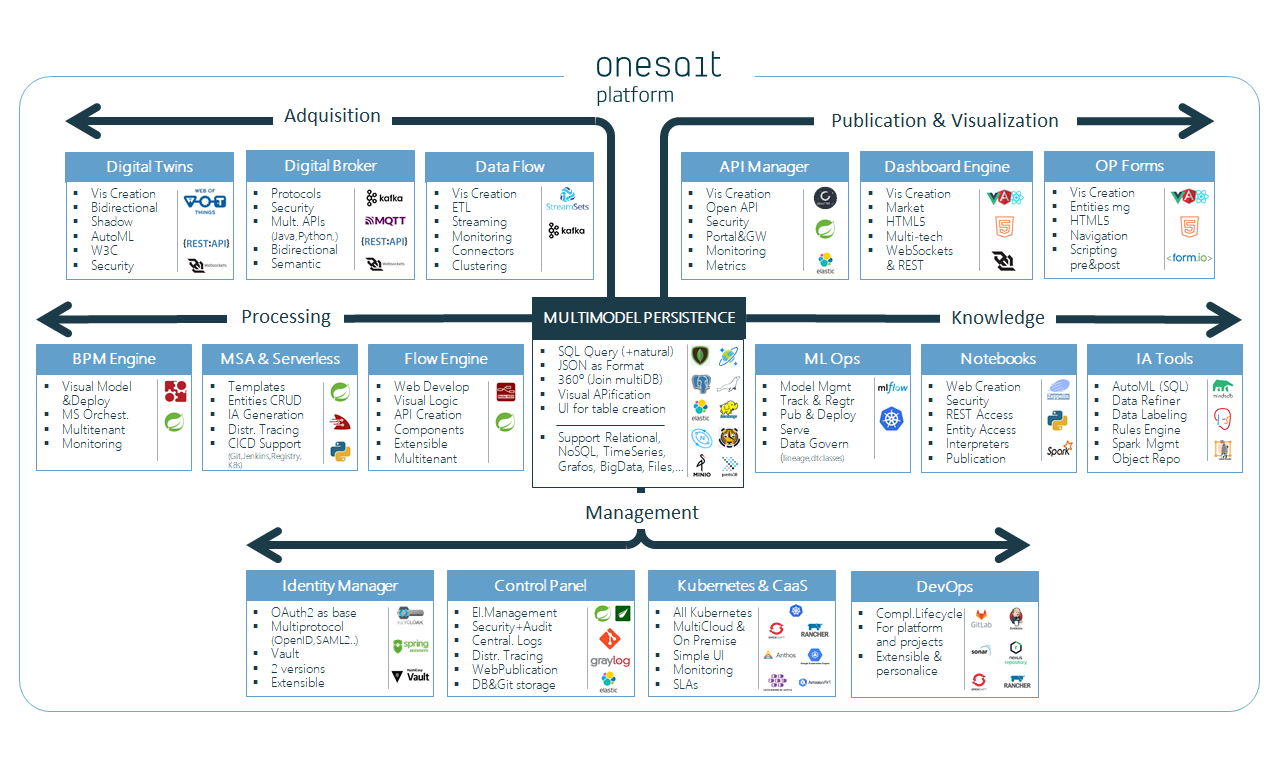
Architektur
The onesait Platform is based on a microservice architecture written in Java using the Spring Boot framework. Each of these modules or microservices runs inside a Docker container.
https://onesaitplatform.com/space/DOCT/2220813314/A+look+at+the+Platform+Architecture
Module

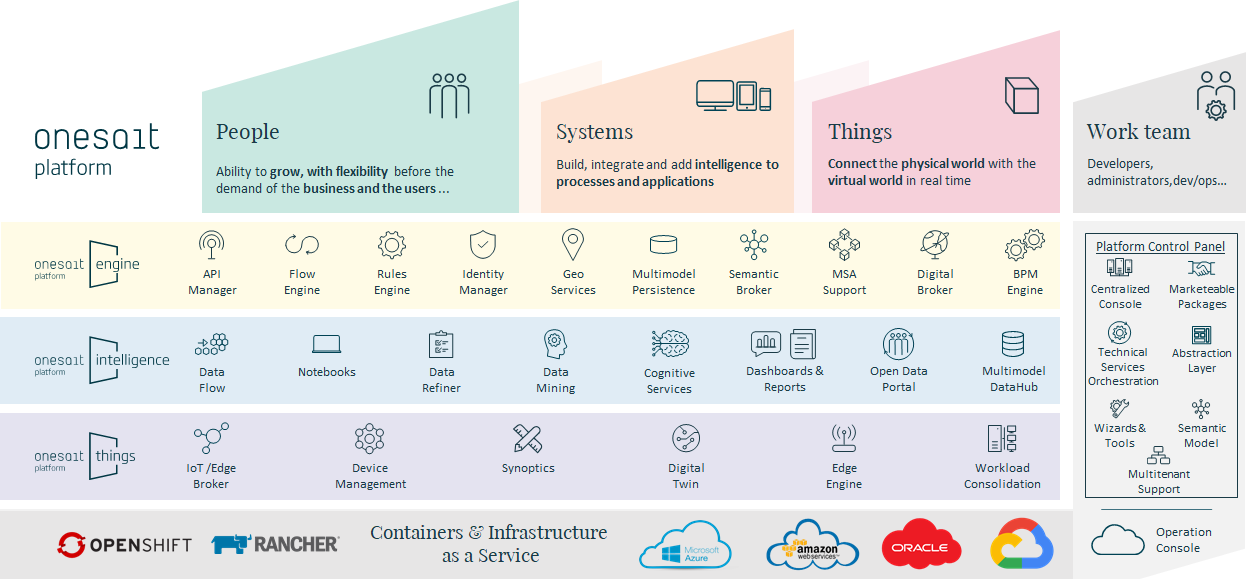
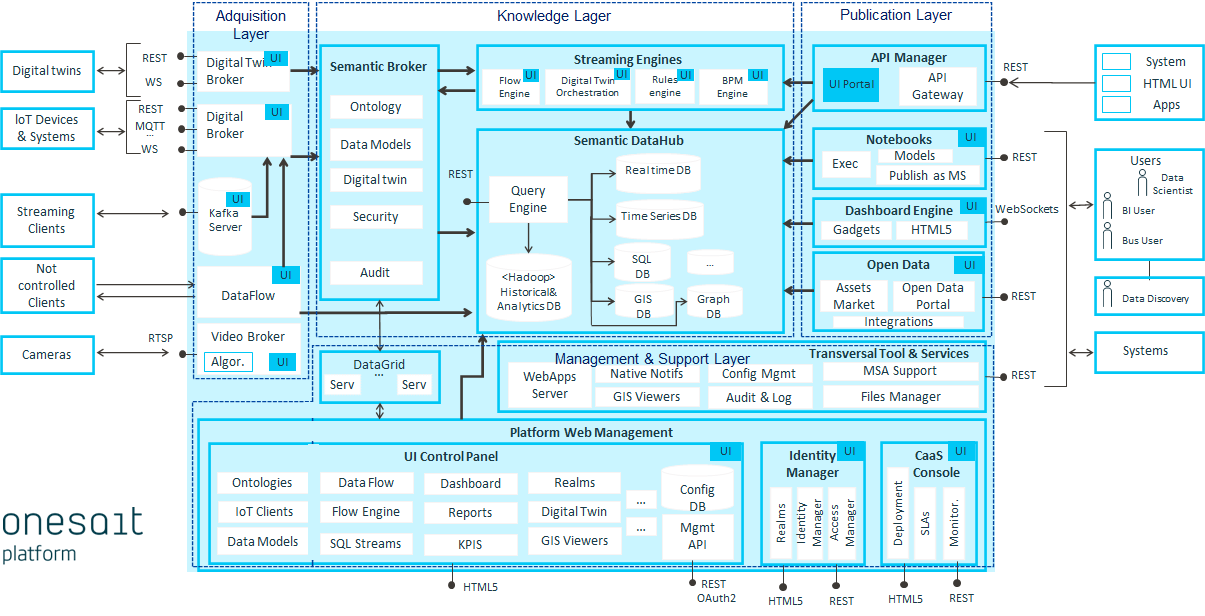
Components
| Component | Description |
|---|---|
| Entities (aka Ontologies) | We are a Data Centric Platform where data is the main asset. The Entity concept allows mapping with all types of repositories (SQL, NoSQL, Graphs, Big Data, Text-search, etc.) abstracting the user of the Platform from its complexity. |
| API Manager | This component makes it possible to make REST interfaces available visually and without programming, on all the elements managed by the Platform. Thus, it is possible to publish models, algorithms, reports, rules, processes, etc. (with the established security criteria) so that other agents or external users can access them. |
| DataFlow | This module allows you to visually create and configure data flows between sources and destinations for both ETL/ELT and Streaming type processes, including transformations and data quality processes in these flows. |
| Dashboard Engine | The Dashboard Engine allows the visual creation and rendering in HTML5 of powerful dashboards, these are built on the information managed by the Platform, offer analytical and geographic capabilities and are multi-device. |
| Flow Engine | The Platform integrates this component, which allows you to create process flows, visually orchestrating pre-created components and customized logic in a simple way. |
| Notebooks | This module provides data scientists with a multi-user web environment in which to develop analysis models of the information stored in the Platform with their favorite languages (Python, Spark, R, Tensorflow, Keras, SQL, etc.) in an interactive manner. |
| OP Forms | Through Forms, Plataform allows the development of Web applications with a no-code approach. These forms are visually mapped with Entities, support navigation and can be integrated into any Web application (Vue, React, Angular, etc.). |
| Microservices Manager | The Platform manages the entire lifecycle, from automatic creation, compilation, versioning, image generation, upload to the registry and deployment on the Kubernetes cluster. |
| BPM Engine | The Platform integrates a complete BPM engine that allows us to carry out processes such as Claims management. |
| AI Code Generation | The Platform is integrated with several AI engines, which help us to generate code on the different components, such as the generation of SQL code from natural language, the generation of pipelines in the DataFlow, of flows in the FlowEngine, etc. |
| Serverless Manager | This module allows developers to develop business logic (functions) in different languages (Java, Python, Node, Spring, etc.) without having to worry about load balancing, multi-threading and other infrastructure issues and focus only on their code since the Platform itself manages the resources. |
| File Repository | This component allows uploading and sharing files both from the Control Panel and via REST APIs. One of its objectives is to isolate the underlying technology in which the files are stored, so that it is transparent to the user, for that currently supports these technologies: MinIO/AWS, Google Cloud Storage and GridFS. |
| Data Labeling Tool | This engine allows you to tag the information stored on the Platform by tagging data types such as audio, text, images, videos and time series with a simple user interface and then exporting to various model formats. |
First Steps
https://onesaitplatform.com/space/DOCT/3522822145/First+steps+(with+Onesait+Platform+CloudLab)
Deployment
- https://onesaitplatform.atlassian.net/wiki/spaces/DOCT/pages/2220811016/How+to+execute+Platform+with+docker+and+docker-compose
- https://onesaitplatform.com/space/DOCT/2220810720/Platform+deployment+strategy
- https://github.com/onesaitplatform/onesait-cloud-platform-community-deploy
- https://onesaitplatform.atlassian.net/wiki/spaces/DOCT/pages/2220814202/Deployment+on+DevOps
Helm Charts
https://artifacthub.io/packages/search?ts_query_web=onesait&sort=relevance&page=1
Docker Images
https://hub.docker.com/u/onesaitplatform